
Webhooks and workflow integration
CM Box pushes events out to your systems in two ways:
- Webhooks notify your endpoints when content changes — items, folders, sites, and packages.
- Workflow integration connects a package review process to any external workflow engine over a simple HTTP handshake.
Webhooks
Section titled “Webhooks”A webhook is a registration that tells CM Box to POST to a URL you control
whenever a matching event occurs. You manage webhooks through the Admin
group of the REST API (/api/admin/webhooks) — see the REST API Reference
group in the sidebar.
Events
Section titled “Events”A webhook subscribes to one or more of these events:
| Event | Fires when |
|---|---|
ITEM_CREATED |
A content item is created |
ITEM_UPDATED |
A content item is updated |
ITEM_DELETED |
A content item is deleted |
ITEM_PUBLISHED |
A content item is published |
ITEM_ARCHIVED |
A content item is archived |
ITEM_UNARCHIVED |
A content item is unarchived |
ITEM_CATEGORIZED |
A category is added to an item |
ITEM_DECATEGORIZED |
A category is removed from an item |
FOLDER_CREATED |
A folder is created |
FOLDER_UPDATED |
A folder is updated |
FOLDER_DELETED |
A folder is deleted |
SITE_PUBLISHED |
A site is published |
CM Box also emits a PACKAGE_MERGED event when an update package is merged.
Matching
Section titled “Matching”An event triggers a webhook when all of these are true:
- The webhook is enabled.
- The webhook’s repository matches the repository the event occurred in.
- The event is in the webhook’s subscribed events.
- The webhook’s content type filter is empty, or includes the item’s type.
Payload
Section titled “Payload”Deliveries are an HTTP POST with Content-Type: application/json. The body
depends on the webhook’s payload size setting:
-
full— the event name, the complete item data, and the webhook’s own configuration:{"event": "ITEM_UPDATED","data": { ...the full content item... },"webhook": { ...the webhook configuration... }} -
basic— a minimal identifier payload:{"event": "ITEM_UPDATED","data": {"id": "...","name": "...","slug": "...","type": "..."},"webhook": { "name": "my-webhook" }} -
custom— you define the entire request body as a JSON template. String values in the template support{{path}}placeholders resolved by dot-notation against a context ofevent,data(the item), andwebhook. A string that is exactly one placeholder resolves to the raw value with its type preserved (an unresolvable path becomesnull); a string mixing text and placeholders interpolates them as strings. If the template is missing or invalid JSON, delivery falls back to thefullpayload. -
none— thePOSTis sent with no body.
Two fields are stripped from item data before delivery: the item’s card preview is always removed, and extracted full-text content is removed unless the webhook is configured to include it.
You can also configure custom headers on a webhook. Each header value is
either a static string or a dot-notation path resolved against the delivered
item data. In full and basic modes, a payload mapping can additionally
copy values from the item data to extra top-level keys in the body.
Delivery mechanics
Section titled “Delivery mechanics”Webhook deliveries are asynchronous. When an event occurs, CM Box enqueues
one delivery job per matching webhook on a background queue; a dedicated
webhook worker processes the queue and makes the outbound POST. Each
delivery is attempted once — CM Box does not automatically retry failed
deliveries — so design your receiver to respond quickly and reconcile missed
events by querying the API if you need guaranteed consistency.
Workflow engine integration
Section titled “Workflow engine integration”CM Box is workflow-engine-agnostic: rather than shipping a built-in review engine, it drives approvals for update packages (bundles of related content changes) through an HTTP handshake that any workflow engine can implement. An engine only needs to do three things:
- Start a flow from an inbound webhook — accept CM Box’s start call with the package context.
- Make outbound HTTP calls — call back into CM Box’s API to update the package’s workflow state.
- Pause and wait — park on a pending step until a reviewer’s action in CM Box resumes it.
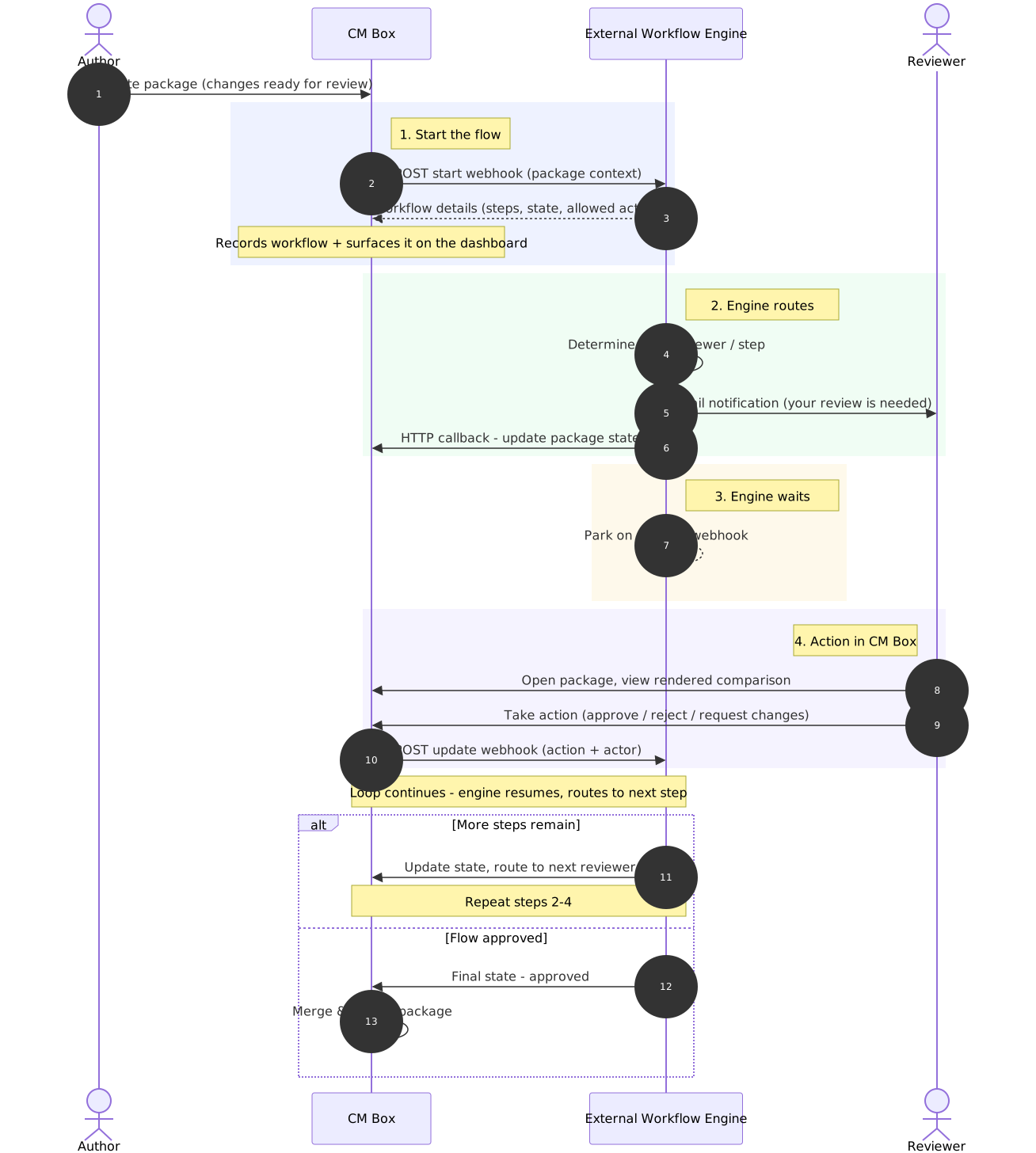
Configuration: connections and definitions
Section titled “Configuration: connections and definitions”Two admin resources describe your engine (managed under Workflow Admin in the REST API Reference):
- A workflow connection (
/api/admin/workflow/connections) points at an engine:baseUrl(the engine’s API),callbackBaseUrl(the CM Box URL the engine calls back to), andauth— how CM Box authenticates to the engine (bearertoken,basiccredentials,api_keywith a configurable header name defaulting toX-API-Key, ornone). - A workflow definition (
/api/admin/workflow/definitions) describes one workflow on that connection: aconnectionId, an optionalprocessDefinitionKey, and aninitialTriggerUrl— the engine path (relative to the connection’sbaseUrl) that CM Box posts to when starting the flow.
Workflow must also be enabled in the repository’s configuration, which lists the workflows available to that repository and can set a default.
Starting a workflow
Section titled “Starting a workflow”A client (typically the CM Box UI) calls:
POST /api/workflow/eventswith { "event": "start", "repositoryId": "...", "packageName": "...", "workflowId": "..." }.
workflowId may be omitted when the repository has a default workflow.
CM Box then posts the start webhook to the engine at
<connection.baseUrl><definition.initialTriggerUrl> with this body:
{ "action": "start", "type": "package", "callbackBaseUrl": "https://<your-cmbox-host>", "statusCallbackUrl": "https://<your-cmbox-host>/api/workflow/status", "payload": { ...the package... }}The engine’s JSON response initializes the workflow state that CM Box records
on the package. CM Box reads these fields from the response:
workflowInstanceId (or id), currentStep, status, nextActionUrl,
assignee, metadata, and steps — an ordered array of
{ name, label, allowedActions, assignedGroups } describing the flow’s steps,
the actions allowed from each, and the security groups whose members can be
assigned to it. Groups that have no access to the package’s repository are
filtered out before the steps are stored.
Callback: the engine updates CM Box
Section titled “Callback: the engine updates CM Box”As the flow progresses, the engine reports state back to CM Box:
POST /api/workflow/statusThe callback accepts an API key in the X-API-Key header (or a signature in
X-Webhook-Signature). The JSON body requires workflowInstanceId,
repositoryId, packageName, currentStep, and status (one of active,
completed, cancelled, error), and optionally carries nextActionUrl
(the engine URL CM Box should post the next reviewer action to), assignee,
comment, and metadata. The workflowInstanceId must match the one
recorded on the package, and each update is appended to the package’s
workflow history.
Reviewer actions
Section titled “Reviewer actions”When a reviewer acts on the package in CM Box, a client posts the action to
POST /api/workflow/events with event set to approve, reject, route
(with an optional targetStep), cancel, or assign (with a required
assignee; the assignee is validated against the current step’s assigned
groups). For engine-bound actions, CM Box posts to the workflow’s current
nextActionUrl with:
{ "workflowInstanceId": "...", "action": "approve", "targetStep": "...", "comment": "...", "user": { "userName": "...", "displayName": "...", "email": "..." }}plus any metadata supplied with the event. The engine’s response (and any
status callback it sends) determines the next step, status, assignee, and
nextActionUrl.
Completion
Section titled “Completion”- When the workflow status becomes
completed, the repository configuration can trigger an automatic merge of the package (and optionally publish on merge). Otherwise the package stays incompletedfor a manual merge. - When a workflow is cancelled through a
cancelaction, the package is deleted.
Reading workflow state
Section titled “Reading workflow state”At any time you can read a package’s workflow state:
GET /api/workflow/{repo}/{packageName}The response’s workflowInfo (or null if no workflow is attached) carries
workflowName, workflowInstanceId, currentStep, status,
nextActionUrl, startedAt, completedAt, assignee, metadata, the
steps array, and a history of entries —
{ timestamp, action, fromStep, toStep, user, comment, externalReference } —
recording every start, action, assignment, and status update.
Related
Section titled “Related”- REST API — request conventions and authentication
- REST API Reference sidebar group — full schemas for the Admin, Workflow, and Workflow Admin endpoints
- Architecture overview